

Get bio links right
Before you spend time building a landing page or negotiating an affiliate deal, you need a functional home base. Instagram and TikTok do not allow clickable links in captions or video descriptions. The only place your audience can click is the single link in your profile bio.
If that link is broken, leads to a generic homepage, or loads slowly, you lose the click entirely. This section covers the technical prerequisites to ensure your link infrastructure is ready before you start driving traffic.
Pick a platform
You cannot put multiple links in your Instagram or TikTok bio directly. You need a "link in bio" aggregator to host a landing page with several buttons. This page acts as a traffic router, directing visitors to your store, latest video, or newsletter.
There are many options, ranging from free tiers to paid tools. For most creators, a simple, fast-loading page is better than one cluttered with analytics dashboards. Popular choices include Lnk.Bio, Shorby, and Pallyy. Choose one that matches your budget and customization needs, then verify your account.

Set up the redirect
Once you have your aggregator account, create a new landing page. Add your primary call-to-action button first—this is usually your most important offer, product, or latest content. Add secondary links below it for other resources.
Test the link on a mobile device. Instagram and TikTok users are almost exclusively on phones. If your buttons are too small or your text is hard to read, you will lose conversions. Ensure the page loads in under two seconds. Slow pages kill momentum.
Update your social profiles
Copy the final URL from your aggregator. Go to your Instagram profile settings and paste it into the "Website" field. Do the same for TikTok. Save the changes.
Your link is now live. However, remember that Instagram and TikTok may take a few hours to index the change. If you click it immediately and it still shows the old link, wait. Do not change the URL again during this window, or you may break the redirect chain.
Verify tracking
Before you share the link, add UTM parameters to your aggregator buttons. This lets you see exactly which platform (Instagram vs. TikTok) is sending traffic. Without this data, you are guessing which content drives results.
Use a free UTM builder to append parameters to each button URL. Check that the links work correctly in your analytics dashboard. Once confirmed, you are ready to start driving traffic.
Build your custom bio link page
Your bio link is the only clickable element in your social media profiles. It acts as the front door to your business, your portfolio, or your latest campaign. If that door is cluttered, slow, or confusing, visitors leave before they convert.
The goal is to create a single, mobile-optimized page that directs traffic to your most important destinations. Whether you are using Instagram or TikTok, the process follows the same logic: choose a platform, structure your links, and test the user experience.
1. Select a link-in-bio platform
Not all bio link tools are created equal. Some are free but cluttered with ads; others are paid but offer clean, conversion-focused designs. For most creators and small businesses, a dedicated tool like Lnk.Bio or Shorby provides the best balance of control and simplicity.
Avoid relying solely on native platform features if you need more than three links. A dedicated landing page allows you to track clicks, update links instantly, and maintain brand consistency across Instagram and TikTok without waiting for feature updates.
2. Structure your link hierarchy
Your bio link page should have a clear hierarchy. Place your most important offer or latest content at the very top. This is your "hero" link. Below that, list secondary links such as your shop, newsletter signup, or other social profiles.
Limit your total links to five or six. Too many options create decision fatigue. If you have more than six destinations, group them under a single "More" button or create multiple, focused landing pages for different campaigns.
Select a background and color scheme that matches your brand. Keep text high-contrast and buttons large enough for thumb taps. Avoid busy backgrounds that make text hard to read. Your design should support your message, not distract from it.
Input your URLs and arrange them by priority. Use clear, action-oriented button text like "Shop New Arrivals" instead of "Link 1." Test the page on a mobile device to ensure buttons are spaced adequately and tap targets are easy to hit.
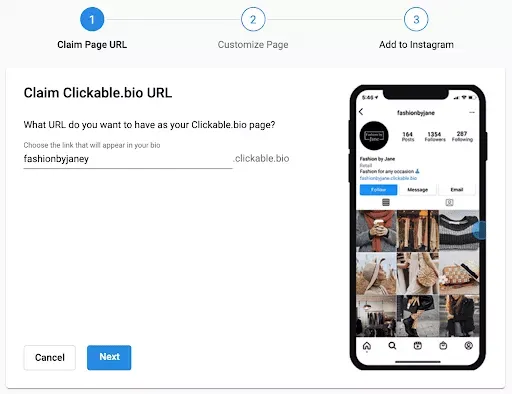
Enable click tracking to see which links drive the most traffic. Use UTM parameters for external links if your platform allows it. This data helps you refine your strategy over time, showing you exactly what content resonates with your audience.
3. Update and maintain your links
A bio link page is not "set and forget." It requires regular maintenance to stay relevant. Update your top link when you launch a new product, post a viral video, or start a limited-time promotion. Stale links erode trust and lower conversion rates.
Check your analytics monthly to identify underperforming links. If a link consistently gets zero clicks, consider removing it or replacing it with a higher-value offer. Keep your page lean and focused on current goals.
4. Test the user experience
Before publishing, test your bio link page on multiple devices and screen sizes. Click every link to ensure it redirects correctly. Check load times on slow mobile connections. A slow or broken link page is worse than no link at all.
Ask a colleague or friend to navigate your page without your guidance. If they hesitate or click the wrong button, simplify your layout. The best bio link pages are intuitive enough that users can find what they need without thinking.


As an Amazon Associate, we may earn from qualifying purchases.
Common mistakes that hurt conversion
Most creators treat their bio link as a digital business card—static, sparse, and forgettable. In 2026, that approach leaves money on the table. Instagram and TikTok users scroll with intent; they want immediate access to what you offer next. When your link page fails to match that speed or clarity, they leave.
The following errors are the most common reasons for low click-through rates. Fixing them is often simpler than building new content.
Cluttered link lists
When you list ten or more links with generic labels like "My Stuff" or "Check This Out," you overwhelm the visitor. No one can prioritize what matters.
The Fix: Limit your visible links to three to five high-value destinations. Use specific, action-oriented text. Instead of "Blog," use "Read the 2026 Strategy Guide." Instead of "Shop," use "Get the Starter Kit." If you have more content, group it under a single "More Resources" link or use a secondary page.
Broken or slow loading pages
A link that leads to a 404 error or a page that takes more than three seconds to load is a conversion killer. Mobile users on TikTok and Instagram are often on cellular data; they will not wait.
The Fix: Test every link on mobile before publishing. Use a lightweight bio link platform (like Lnk.Bio or Shorby) that loads quickly. Avoid embedding heavy video players or complex forms directly on the first screen. Keep the initial load under 1.5 seconds.
Ignoring UTM tracking
If you don’t tag your links, you’re flying blind. You won’t know if a spike in sales came from a TikTok video or an Instagram story. Without this data, you can’t optimize your content strategy.
The Fix: Always append UTM parameters to your links. Use a UTM builder to tag the source (instagram or tiktok), medium (social), and campaign (name of the post). This data flows into Google Analytics, letting you see exactly which posts drive traffic.
Static, evergreen design
Changing your bio link page only when you launch a product is a missed opportunity. Your audience’s interests shift with trends, seasons, and your current content.
The Fix: Update your bio link page weekly. Highlight the content you just posted. If you’re running a limited-time offer, put it at the top with a clear deadline. Treat your bio link as a dynamic landing page, not a static directory.
Weak call-to-action (CTA)
You’ve driven traffic to your link page, but you haven’t told them what to do. Vague instructions lead to hesitation.
The Fix: Add a clear, single CTA above your link list. Use phrases like "Click below to start," "Grab your discount here," or "Join the waitlist." Make the first button the most prominent element on the page. Remove any secondary buttons that compete for attention.
Using outdated platforms
Some creators still use free, ad-heavy bio link tools that display competitor logos or slow down load times. These tools signal low professionalism and can deter potential customers.
The Fix: Invest in a clean, branded bio link solution. Options like Lnks.Bio or Shorby offer ad-free experiences with custom domains and analytics. The cost is minimal compared to the value of a polished, trustworthy first impression.
No comments yet. Be the first to share your thoughts!