

Set up your custom bio link
Your Instagram and TikTok followers need a single, reliable destination. A dedicated bio link page replaces scattered URLs with a branded hub. Tools like Bio Link let you build this page in seconds without coding.
Unlike basic link lists, a custom bio link page supports posts, emails, and embeds. It acts as your digital storefront. Customizing it ensures your audience recognizes your brand before they even click through.
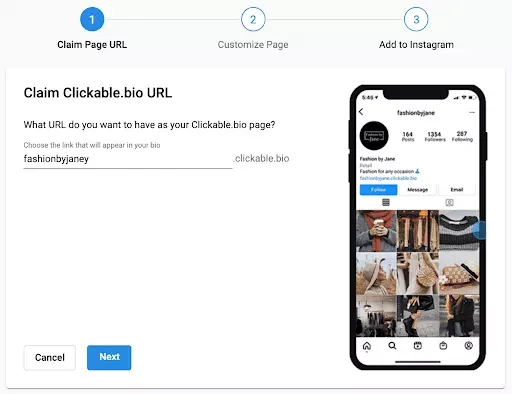
Sign up for Bio Link using your email or social account. The platform automatically generates a default page. This gives you a live URL immediately, even before you finish customizing.
Select a template that matches your content style. Whether you are a creator, artist, or business, starting with a pre-designed layout saves time. The drag-and-drop editor allows you to swap elements instantly.
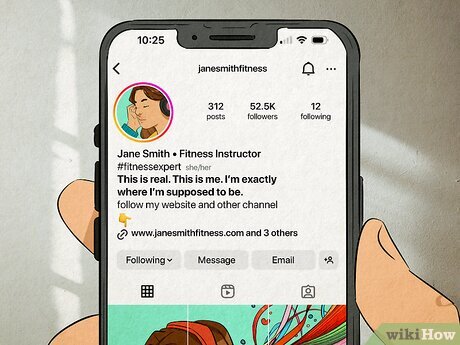
Upload your profile photo and logo. Adjust the background colors and fonts to match your Instagram or TikTok aesthetic. Consistency builds trust and makes your link page feel like an extension of your social profiles.
Drag your most important links to the top. Add social media icons, recent posts, or email signup forms. Bio Link supports embeds, so you can display newsletters or videos directly on the page.
Change the default address to something memorable. A clean URL like bio.link/yourname looks professional and is easier for followers to type or remember than a string of random characters.
Your bio link page is now live. Update it regularly to reflect your latest content or promotions. This single page becomes the central hub for all your audience interactions.
Add and organize your links
Your bio link page is the only real estate you control on Instagram and TikTok. Without it, you’re forcing followers to hunt for your work across disjointed tabs. Treat this page as a digital storefront: every button should have a clear purpose, and every label should tell the user exactly what they’ll get.
Start by populating your high-value destinations. If you’re a creator, prioritize your latest video, your newsletter signup, and your most popular product or service. Avoid cluttering the page with low-priority links like generic social profiles you’ve already linked in your bio text. Focus on the actions that drive growth or revenue.
Use clear, action-oriented labels. Instead of "Read More," try "Watch the Full Tutorial" or "Get the Recipe." Specificity reduces friction and increases click-through rates. Keep the list short—five to seven links is usually the sweet spot for mobile users.
Update Instagram and TikTok profiles
Bio Link works best as a clear sequence: define the constraint, compare the realistic options, test the tradeoff, and choose the path with the fewest hidden costs. That order keeps the advice usable instead of decorative. After each step, pause long enough to check whether the recommendation still fits the reader's actual situation. If it depends on perfect timing, unusual access, or a best-case budget, include a simpler fallback.
Track clicks and adjust strategy
Analytics turn guesswork into a repeatable system. By monitoring which bio link destinations drive the most traffic, you can shift your focus to the content that actually moves the needle for your Instagram and TikTok audiences.
Check your native platform insights
Start with the data already available in Instagram and TikTok. Both platforms provide detailed breakdowns of how many profile visits came from your posts versus your bio. Use this to gauge the overall health of your link-in-bio page.
If your profile visits are high but your website clicks are low, your link placement or call-to-action may need adjustment. Conversely, if clicks are high but profile visits are low, your content strategy might be attracting the wrong audience.
Audit your bio link performance
Use your bio link tool’s analytics to see which specific buttons or links get the most engagement. Look for patterns in your top-performing content. Are your tutorials driving more traffic than your product launches? Is your email signup link getting ignored?
Keep a simple record of your top three links each month. This helps you identify what your audience values most and where to invest your creative energy.
Monthly bio link audit checklist
-
Check for broken links or outdated promotions
-
Update top-performing links with fresh content or new offers
-
Refresh visuals or button colors to maintain interest
Iterate based on data
Adjust your strategy every 30 days. If a specific link consistently underperforms, replace it with a higher-priority offer. If a certain type of content drives significant traffic, create more of it and feature the link more prominently in your bio.
This cycle of tracking, analyzing, and adjusting ensures your bio link remains a dynamic asset rather than a static placeholder.
Common bio link mistakes to avoid
Even the best content won’t drive traffic if your bio link setup creates friction. Creators often overlook small technical details that silently kill click-through rates on Instagram and TikTok. Fixing these errors is usually a matter of seconds, but the impact on your engagement is immediate.
Using default or messy URLs
Most free bio link tools assign a long, random string of characters as your default URL. These look untrustworthy and are hard to remember. A messy link signals low effort. Always switch to a branded short link or a custom domain. It takes minutes to set up but makes your profile look established and professional.
Cluttering the landing page
Your bio link page is your digital storefront, not a dumping ground. When you list every podcast, affiliate deal, and personal blog post, visitors get decision paralysis. They scroll past without clicking anything. Curate your list to show only your top three or four priorities. Remove outdated links immediately. A clean, focused page guides users exactly where you want them to go.
Ignoring mobile optimization
Over 90% of Instagram and TikTok traffic comes from mobile devices. If your bio link page loads slowly, has tiny buttons, or requires horizontal scrolling, users will leave instantly. Test your link on a phone before posting it. Ensure buttons are large enough to tap with a thumb and that text is legible without zooming. Speed and usability are non-negotiable for social traffic.
Failing to update links regularly
A stale bio link is a dead end. If you promote a specific campaign, product launch, or event, that link must be active and relevant. Leaving old links up confuses new followers and damages your credibility. Treat your bio link as a living page. Update it weekly to reflect your current goals. Consistency builds trust, and trust drives clicks.
Review every link on your page. Remove anything older than three months. Keep only your highest-performing content.
Group related links together. Use clear, action-oriented button text like "Shop New Collection" instead of "Link 1."
Open your link in an incognito window on your phone. Check load speed and button size. Fix any issues before sharing.
No comments yet. Be the first to share your thoughts!