

The state of Threads links
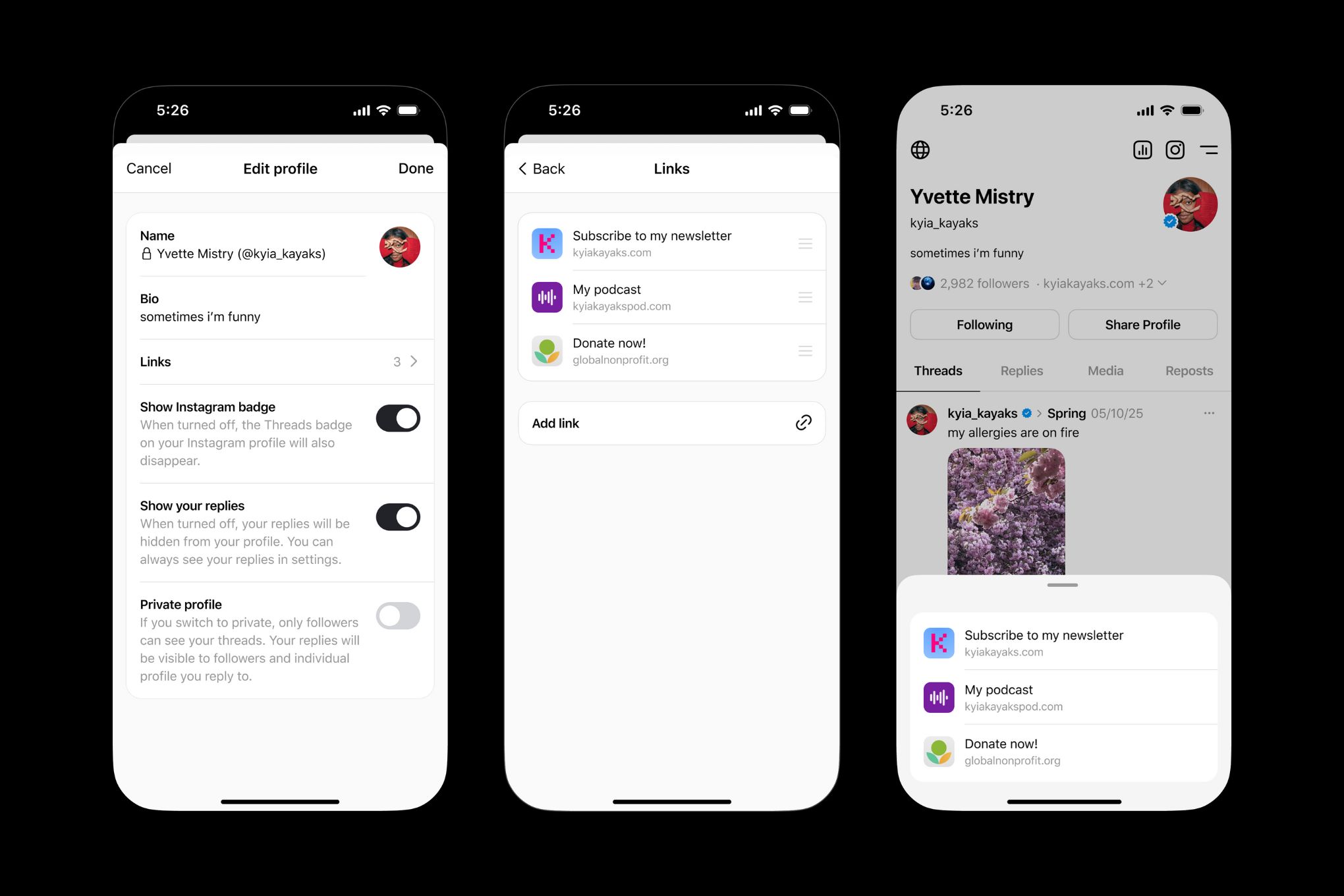
Threads is still a very young platform, launched in July 2023), and its feature set is evolving rapidly. Unlike Instagram and TikTok, Threads currently limits users to a single link in their bio. This is a constraint many find frustrating, especially those accustomed to directing followers to multiple resources. It feels restrictive, to say the least.
The standard workaround is a link-in-bio tool. These services act as a hub for multiple destinations behind one URL. Creators like Adedotun 4A have shared tutorials on setting these up as recently as November 2024, but the core reality remains: you only get one slot in the profile.
This single-link limitation forces a degree of prioritization. You can’t simply list everything you want people to see. It demands a thoughtful approach to what’s most important in that moment. The reliance on link-in-bio tools isn’t ideal, it's a necessity for anyone trying to leverage Threads for more than just casual conversation.
Why your link strategy needs to change
Threads is growing because Meta tied it directly to Instagram. Since the app is built for conversation, your bio link is the only way to move those chats toward a sale or a deeper read. If you don't have a plan for that traffic, you're just talking into a void.
A well-optimized link in your Threads bio isn't just about driving traffic; it's about directing the right traffic. Are you trying to build brand awareness, or are you aiming for direct conversions? The answer dictates the links you prioritize. A link to a recent blog post builds authority, while a link to a product page encourages immediate action.
Given Meta’s track record, it’s reasonable to expect Threads to become a significant traffic source over time. Ignoring the importance of that single link is a missed opportunity. A strategic approach – even within the current limitations – is essential for maximizing your presence on the platform.
Tools to bypass the single-link limit
Link-in-bio tools are the solution to Threads’ single-link problem. Services like Your Custom Link, Linktree, and Beacons allow you to create a customized landing page with multiple links, all accessible through a single URL. They bridge the gap between the platform’s limitation and the need to share diverse content.
These tools generally offer core features like the ability to add multiple links, customize the appearance of your landing page (branding, colors, fonts), and access basic analytics. Pricing varies. Linktree, for example, offers a free plan with limited features, while paid plans start around $5 per month. Beacons has similar tiered pricing. Your Custom Link offers a range of plans, starting with a free option and scaling up based on features and analytics needs.
The value proposition is simple: a centralized hub for all your important links. Instead of constantly updating your Threads bio, you can update your link-in-bio page. Your Custom Link stands out because of its multi-platform capabilities – you can manage links for Threads, Instagram, TikTok, and more from a single dashboard. This is a huge time saver.
- Linktree is the most recognizable option and works well if you just need something fast and free.
- Beacons is better for creators who want to collect emails or sell digital products directly from the link page.
- Your Custom Link is useful if you manage several different social accounts from one dashboard.
Link-in-Bio Tool Comparison for Threads Users (2024)
| Tool | Customization Flexibility | Analytics Depth | Platform Compatibility | Affiliate Features |
|---|---|---|---|---|
| Your Custom Link | High - Extensive design options | Detailed - Tracks link clicks and visitor behavior | Yes - Supports multiple platforms including Instagram, TikTok, and more | Yes - Built-in tools for affiliate link management |
| Linktree | Medium - Offers themes and basic customization | Basic - Provides overall click counts | Yes - Wide platform support | Yes - Supports affiliate links, but with limitations on some plans |
| Beacons | Medium - Focuses on mini-website style layouts | Basic - Offers views and click data | Yes - Supports multiple platforms | Limited - Affiliate marketing features are not a primary focus |
| Shorby | Medium - Offers branding and some customization | Detailed - Provides insights into visitor demographics | Yes - Supports multiple platforms | Yes - Offers tools for affiliate link tracking and management |
| Taplink | High - Focuses on storefront and booking features | Detailed - Offers advanced analytics and integrations | Yes - Supports multiple platforms | Yes - Designed for direct sales and affiliate marketing |
| Lnk.Bio | Low - Simplistic, text-based link lists | Basic - Provides basic click tracking | Yes - Supports multiple platforms | Limited - Primarily for simple link sharing |
Qualitative comparison based on the article research brief. Confirm current product details in the official docs before making implementation choices.
Better ways to use your bio link
Simply listing links isn’t enough. You need a strategy. Prioritize links based on current campaigns or promotions. Is there a new product launch? A limited-time offer? Make those links prominent. Consider what’s happening on Threads – respond to trending topics with relevant links.
Clear call-to-actions (CTAs) are crucial. Instead of just “Link to Website,” use “Shop Now,” “Read the Blog,” or “Learn More.” Each link should have a purpose, and the CTA should clearly communicate that purpose. Think of your link-in-bio page as a mini-landing page – it should guide users towards specific actions.
Don’t set it and forget it. Update your links seasonally, or whenever your priorities change. Promoting holiday sales? Update your links to reflect those promotions. Consider using QR codes on other marketing materials (business cards, flyers, etc.) that link directly to your Threads bio. This creates a seamless connection between your offline and online presence.
Analytics: Measuring Your Threads Link Performance
Tracking clicks is essential for understanding what’s working and what’s not. Most link-in-bio tools, including Your Custom Link, provide basic analytics. But it’s more than just seeing how many clicks each link gets. You need to understand where those clicks are coming from.
Key metrics to monitor include click-through rate (CTR), top-performing links, and traffic sources. A high CTR indicates a compelling CTA. Identifying your top-performing links helps you understand what your audience is most interested in. Knowing your traffic sources (Threads, Instagram, etc.) helps you optimize your overall strategy.
For more detailed tracking, use UTM parameters. These are tags you add to your links that allow you to track them in Google Analytics. A/B testing different link arrangements and CTAs is also crucial. Experiment with different wording and placement to see what resonates with your audience. Data-driven decisions are always better than guesswork.
Affiliate Marketing and Threads
Threads presents an interesting opportunity for affiliate marketing. You can use your bio link to promote affiliate products and earn a commission on sales. Tools like Your Custom Link make this easier by supporting affiliate link management and cloaking – hiding the long, unsightly affiliate URL behind a cleaner, branded link.
However, transparency is key. Always disclose when you’re using affiliate links. This builds trust with your audience and complies with FTC guidelines. Authenticity is crucial on Threads; promote products you genuinely believe in and that are relevant to your audience.
Be mindful of Threads’ content policies regarding affiliate links. While they don’t explicitly prohibit them, overly promotional content may be frowned upon. Focus on providing value and building relationships, and use affiliate links strategically.
What to expect by 2026
Predicting the future is always tricky, but based on current trends and Meta’s overall strategy, it’s likely that Threads’ bio link functionality will evolve. Will Meta eventually introduce native support for multiple links? It seems plausible, given the user demand and the features offered by competitors.
Closer integration with other Meta platforms is also a possibility. Imagine being able to seamlessly link your Threads bio to your Instagram Shop or Facebook Marketplace. More advanced analytics within Threads itself would also be a welcome addition.
It’s even conceivable that Meta will introduce native link-in-bio features directly within Threads, eliminating the need for third-party tools. I'm not sure about this one, but it’s a logical progression. For now, link-in-bio tools remain essential for maximizing your Threads presence.

No comments yet. Be the first to share your thoughts!