The single-link bottleneck
Instagram and TikTok share a frustrating limitation: you can only click one link in your profile. This restriction forces you to choose between sending traffic to your website, your latest video, or your shop. You lose the ability to guide followers to different parts of your content ecosystem. A custom bio link resolves this by acting as a central hub, allowing you to direct traffic where it matters most.
Turning followers into owned audience
A bio link page aggregates all your important destinations into one clickable interface. Instead of losing visitors who click the wrong link or leave because they can't find what they want, you keep them engaged. This single page helps you grow your email list, promote specific campaigns, and track referrals effectively.
Essential for conversion
Without a dedicated landing page, you leave engagement on the table. A custom bio link turns casual scrollers into active users by providing clear paths to your content. It serves as the bridge between social media algorithms and your actual business goals. Building a robust bio link is the first step in your Bio Link Guide strategy.
Choose a bio link tool that fits your needs
Selecting the right platform for your Bio Link Guide starts with matching features to your actual workflow. You don't need a full website builder if you only want to share three product links. Conversely, a creator posting daily tutorials needs robust analytics and email capture.
Compare the top options below to see where each tool excels. Focus on customization, analytics depth, and pricing tiers.
| Tool | Customization | Analytics | Price |
|---|---|---|---|
| Bio.link | High | Standard | Free/Pro |
| Linktree | Medium | Basic | Free/Pro |
| Kleap | High | Advanced | Free/Pro |
| Own.page | Medium | Standard | Free/Pro |
Most creators start with the free tier to test the interface. Upgrade only when you need specific features like custom domains or detailed click tracking. This approach keeps your initial costs low while you refine your content strategy.

Build your bio link page step by step
Turning a single URL into a functional hub requires a structured approach. A well-built Bio Link Guide page acts as a digital business card, directing traffic from Instagram and TikTok to your website, shop, or newsletter. Follow this sequence to create a page that converts visitors into followers or customers.
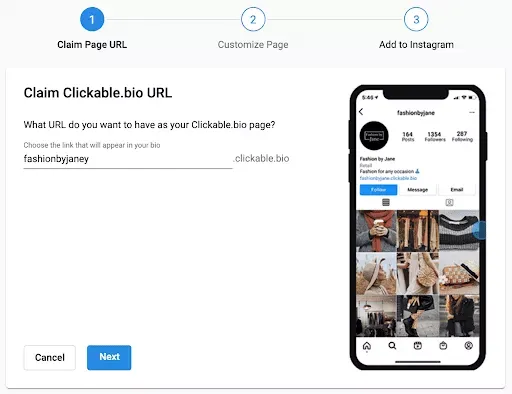
Start by selecting a bio link tool. Popular options include Linktree, Beacons, or own.page. Create an account using your email or social login. These platforms provide the infrastructure to host multiple links under one domain. Look for a free tier if you are just starting out, as most features you need are available without payment.
Customize the page to match your Instagram or TikTok aesthetic. Upload a profile photo and choose a background color or image that reflects your brand identity. Keep the design clean and uncluttered. A busy background can make text hard to read, reducing click-through rates. Ensure your profile picture is high-resolution so it looks sharp on mobile devices.
This is the core of your bio link page. Add buttons for your most important destinations: your latest video, shop, newsletter sign-up, or other social profiles. Drag and drop the links to arrange them by priority. The top link should be the one you want users to see first. Use clear, action-oriented button text like "Watch Now" or "Shop Collection" instead of generic labels.
Before finalizing, use the preview mode to test your page on a mobile device. Check that all buttons are clickable and images load correctly. Verify that the layout looks good on both iOS and Android screens. Once satisfied, publish the page and copy the new URL. Update the link in your Instagram and TikTok bio sections immediately.
Most bio link tools provide analytics dashboards. Monitor which links get the most clicks and which ones are ignored. Use this data to adjust your link order or content strategy. If a specific link underperforms, consider changing its text or moving it lower down the list. Regular updates keep your bio link relevant and engaging.
Add your bio link to Instagram and TikTok
Your custom URL is ready, but it won’t work until you place it in the right spot on your social profiles. This Bio Link Guide walks you through the exact taps needed to make your link live on Instagram and TikTok so your audience can actually find it.
Update your Instagram profile
Open the Instagram app and tap your profile picture in the bottom right corner. Tap the Edit Profile button located just below your bio text. Scroll down to the Links section and tap Add external link.
Paste your custom URL into the Web Address field. You can add a title to help users know where the link goes, then tap Done in the top right corner. Your link is now live on your Instagram profile.
Tap Edit Profile on your Instagram profile page. Scroll to the Links section and select Add external link. Paste your URL into the Web Address field and tap Done.
Update your TikTok profile
Open the TikTok app and tap your profile icon in the bottom right corner. Tap the Edit Profile button near the top of the screen. Tap the Add Link button, then select Website.
Paste your custom URL into the text box and tap Save in the top right corner. Your link is now live on your TikTok profile.
Tap Edit Profile on your TikTok profile. Select Website, paste your URL, and tap Save.
Track clicks and optimize your links
Your custom bio link is only as valuable as the data it generates. Without tracking, you are guessing which content drives traffic to your website or shop. Use your analytics dashboard to identify which destinations get the most clicks. This data tells you what your audience actually wants, allowing you to adjust your strategy in real time.
Rotate your links based on these insights. If a specific product launch or blog post sees a spike in clicks, move that URL to the top of your stack. Keep high-performing links visible while archiving those that consistently underperform. This keeps your bio link fresh and relevant to your current campaigns.
Common questions about bio links
This Bio Link Guide answers the most frequent questions about creating, using, and finding social media links.
How to use bio link?
Place the URL in your Instagram or TikTok profile. When followers click it, they land on a single page with all your important links, such as your latest video, shop, or newsletter. This centralizes your traffic instead of forcing users to search for individual pages.
How do I create a good bio link?
Start with a clear title and high-contrast buttons. Group links by priority, putting your most important content at the top. Use your Bio Link Guide to ensure the design matches your brand colors and loads quickly on mobile devices. Avoid cluttering the page with too many options.
How do you find a bio link?
Look at the bottom of a creator’s profile. Most platforms allow only one clickable link in the bio section. If you see a URL or a short link like linktr.ee, that is the entry point to their full list of resources.
How do I join the link in bio?
Click the URL in the profile, then select the specific button that matches your interest. Whether you want to subscribe to a list or buy a product, the button acts as a direct gateway to that specific destination.
No comments yet. Be the first to share your thoughts!