

Choose a bio link tool
Your bio link tool acts as the digital address for your Instagram and TikTok profiles. It is the single destination where followers land when they tap your profile. Selecting the right platform depends on whether you need a simple list of links or a full mini-site with branding and analytics.
The market offers several reliable options. Lnk.Bio provides a straightforward way to share multiple social profiles and important links with one URL. Bio Sites, backed by Squarespace, allows creators to showcase links and earn money directly. Canva offers a website builder with templates for those who want a visually polished page. Bio Link takes a different approach, offering a fully customizable personal site that supports posts, emails, and embeds.
To decide which tool fits your workflow, compare their core features. The table below outlines the differences in cost, customization, and analytics.

| Tool | Cost | Customization | Analytics |
|---|---|---|---|
| Lnk.Bio | Free / Paid | Basic | Basic |
| Bio Sites | Free / Paid | Moderate | Detailed |
| Canva | Free / Paid | High | Basic |
| Bio Link | Free / Paid | High | Detailed |
Start with the free tier of the tool that matches your immediate needs. Most platforms allow you to upgrade later as your audience grows. This approach lets you test the interface without financial commitment.
Create your link page
Your bio link page acts as the central hub for your Instagram and TikTok traffic. Instead of forcing followers to hunt for individual URLs, you give them one clean destination that houses everything you want to share. This setup turns casual scrollers into engaged visitors by removing friction from the discovery process.
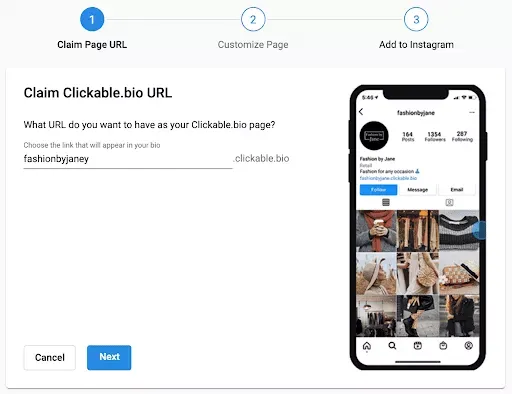
Start by choosing a dedicated bio link tool. Platforms like Pixieset or Bio Link offer free tiers that let you consolidate websites, shops, blogs, and social posts into a single, manageable interface. These tools are designed specifically for social media profiles, ensuring your links load quickly and look professional on mobile devices.
Most platforms provide pre-built templates. Pick one that aligns with your visual identity rather than starting from scratch. A clean, minimalist layout usually performs best because it directs attention to the links themselves rather than decorative elements. Ensure your brand colors and fonts are consistent with your Instagram and TikTok profiles to build recognition.
List your most important content at the top. The first two links are the most visible without scrolling, so place your newest video, latest product drop, or primary call-to-action there. Group related links together—for example, put all your social profiles in one section and all your shop items in another. This structure helps users find what they need without feeling overwhelmed.
Since the majority of your traffic will come from mobile apps, you must test the page on a smartphone. Tap every link to ensure it redirects correctly and doesn’t lead to a 404 error. Check that buttons are large enough to tap easily and that text is legible without zooming. A broken link or a tiny button can cause visitors to leave immediately.
Once your page is live, update it regularly. Your Instagram and TikTok audiences expect fresh content, so keep your bio link page current with your latest posts. This consistency reinforces your brand presence and ensures that every visitor, whether they found you through a reel or a post, has a smooth path to your content.
Customize design and branding
Your bio link is the landing page for your social traffic. If it looks generic, visitors bounce. A branded design builds trust and guides users to your offers. This section covers the visual setup that turns a plain list of URLs into a professional hub.
Pick a layout that matches your content
Most platforms offer three main layouts: grid, list, and scroll. Choose based on your content type.
- Grid: Best for visual portfolios or product showcases. It creates a clean, app-like feel.
- List: Ideal for text-heavy links or news updates. It’s easy to scan on mobile.
- Scroll: Works well for long-form content or stories. It feels more editorial.
Set your visual identity
Consistency is key. Use the same color palette and fonts you use on Instagram and TikTok. Most tools let you upload custom fonts or pick from a library. Stick to two colors: one for backgrounds and one for buttons.
Add a profile photo and header
Your profile photo should be high-resolution. Use your brand logo or a clear headshot. If the tool allows a header image, use it to highlight your current campaign or latest video. Keep it simple; text-heavy headers are hard to read on small screens.
Style your buttons
Buttons are the most important element. Make them large enough to tap easily. Use contrasting colors for call-to-action buttons like "Shop Now" or "Watch Video." Avoid cluttering the page with too many options. Limit your main links to three to five items.
Browse your platform’s library. Filter by "minimal" or "professional" to avoid cluttered designs. Pick a base that matches your industry.
Upload your logo and profile photo. Set your primary brand color as the background or button color. Ensure high contrast for readability.
Drag your links into order. Put the most important link at the top. Preview on mobile to check button sizes and spacing.
Add links to Instagram and TikTok
Your bio link is the only clickable real estate on these platforms. Place your chosen URL here to direct traffic to your store, newsletter, or latest content.
- Open the Instagram app and go to your profile.
- Tap Edit Profile below your bio text.
- Tap the Links section.
- Select Add Link.
- Enter your full URL and a label (e.g., "Shop Now").
- Tap Done to save.
- Open the TikTok app and go to your profile.
- Tap Edit profile in the top right.
- Tap Website.
- Enter your full URL in the text field.
- Tap Save.
Note: TikTok requires at least 1,000 followers or a business account to add a website link.
Click the link on your own profile to ensure it opens correctly on mobile devices. Check that UTM parameters are tracking properly if you are using an analytics tool.
Keep your link concise. Avoid using bit.ly or other redirect services if possible, as some platforms may flag them as spam. Use a dedicated bio link tool to host multiple destinations.
Track performance and iterate
Bio links are not static; they are living metrics. Treat your link-in-bio page like a dashboard. Every click, tap, and bounce tells you what your audience actually wants versus what you think they want.
Start by reviewing your analytics weekly. Look for the "click-through rate" on your primary links. If a link gets zero clicks, ask why. Is the button text unclear? Is the content outdated? Swap it out. If a link spikes, double down. Pin that content or create more like it.
Use this monthly audit checklist to keep your strategy tight:
Iteration is about small, frequent changes. Don't overhaul your entire page every week. Change one variable at a time—like a headline or an image—and watch how the numbers shift. This method turns guesswork into a clear path for growth.
Common bio link: what to check next
Here are answers to the most frequent questions about setting up and managing your bio link.
What are the best bio link platforms?
The best bio link platforms allow you to share multiple links with one URL. Lnk.Bio is a popular choice because it lets you share all your social media profiles and important links in one place. When choosing a platform, look for one that matches your specific needs, whether that’s analytics, customization, or ease of use.
Can I use the same bio link for Instagram and TikTok?
Yes. Since both platforms only allow one clickable link in the bio, you can use the same bio link tool for both. This keeps your digital presence consistent and makes it easier for followers to find your content across different apps.
How do I update my bio link without changing the URL?
Most bio link tools provide a single, permanent URL that you can update from a dashboard. When you add or remove links, the destination URL stays the same. This means you don’t need to go back and change the link in your Instagram or TikTok profile every time you post new content.
No comments yet. Be the first to share your thoughts!