

Pick the right link management tool
Your bio link is the only clickable real estate on Instagram and TikTok. Choosing a tool that balances ease of use with reliable customization determines whether that traffic converts into followers or sales. The market offers several dedicated platforms, each with distinct strengths for social creators.
Lnk.Bio remains a staple for its simplicity. It allows you to stack multiple links under a single URL without requiring a complex setup. This makes it ideal for creators who want to share social profiles and essential links immediately. For those already invested in design, Canva offers a built-in link-in-bio feature that lets you use existing templates to maintain brand consistency. Bio Sites, powered by Squarespace, provides a free option that includes monetization features, allowing you to earn money directly from your link page.
The following comparison highlights the core differences to help you decide which platform fits your current workflow.
| Tool | Cost | Design Control | Best For |
|---|---|---|---|
| Lnk.Bio | Free/Paid | Basic templates | Quick setup |
| Canva | Free/Paid | High customization | Brand consistency |
| Bio Sites | Free | Moderate | Monetization |
When selecting a tool, prioritize stability and ease of editing. Your link page should load quickly on mobile devices and allow you to update links in real time. Avoid platforms that require extensive coding or complex integrations unless you have a specific technical need. Start with the free tier of one of these options to test the interface before committing to a paid plan.
Design your landing page layout
Your bio link page is the digital storefront for your Instagram and TikTok traffic. If the layout is cluttered or confusing, visitors will leave before clicking anything. A well-structured page acts like a clear signpost, guiding users directly to the content or product you want them to see.
Start by establishing a visual hierarchy. Your most important link—the one you want to drive the most traffic to—should be at the very top. Use a larger font, a contrasting button color, or a brief headline to make it stand out. Secondary links can follow in a smaller, uniform style. This structure reduces cognitive load and helps users make decisions quickly.
Keep the design clean and mobile-first. Most of your traffic will come from phones, so ensure buttons are large enough to tap easily and text is legible without zooming. Avoid overwhelming the page with too many options; four to six links is usually the sweet spot for clarity and conversion. Consistency with your social media branding—using the same colors, fonts, and tone—helps build trust and makes the transition from social app to landing page feel seamless.
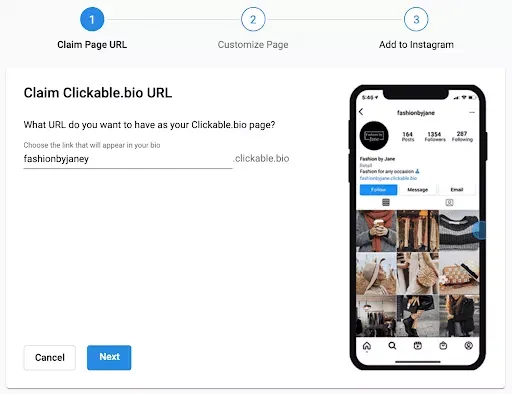
Select a template that prioritizes readability over flashy graphics. Look for designs with ample white space and clear button distinctions. Avoid templates that require horizontal scrolling or have small text, as these frustrate mobile users. The goal is a layout that feels open and inviting, not cramped.
Identify the single most important action you want visitors to take, such as buying a new product or reading your latest blog post. Place this link at the very top of your page. Use a distinct color or a "Featured" badge to draw the eye immediately. This is your conversion anchor.
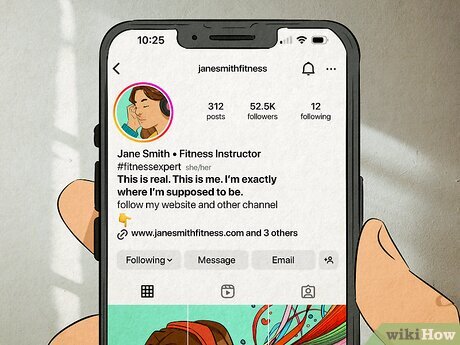
Organize remaining links into clear categories if you have many resources. For example, group "Shop" links together, then "Socials," then "About." Use short, descriptive headers for these groups. This helps users scan the page and find what they need without feeling overwhelmed by a long, undifferentiated list.
Replace plain text links with styled buttons. Buttons imply interactivity and are easier to tap on small screens. Use action-oriented text like "Shop Now," "Watch Video," or "Get the Guide" instead of generic terms like "Click Here." This small change significantly improves click-through rates.
Add and organize your bio links
Your bio link is a single address that holds multiple destinations. Adding links correctly ensures followers don’t hit a dead end. Start by opening your link-in-bio tool and selecting the option to add a new URL. Paste the full address of the page, video, or product you want to share.
Most platforms let you customize the button text. Instead of pasting the raw URL, use clear labels like "Shop Summer Collection" or "Watch Latest Tutorial." This small change reduces confusion and increases click-through rates.
Organize your links by priority. Place your most important content at the top. Use categories or sections if your tool supports them, grouping related links together. This structure helps visitors find what they need without scrolling endlessly.
Open your bio link dashboard. Click "Add New Link." Paste the destination URL and set a clear, action-oriented title. This should be your most critical content, such as a latest video or a product launch.
Create categories like "Videos," "Shop," or "About." Add secondary links under these headers. Grouping helps followers navigate your content library efficiently, especially if you have more than five links.
Open your bio link on a mobile device. Click every button to ensure it leads to the correct destination. Check that the layout looks clean and that no links are broken or misaligned.
Update your Instagram and TikTok profiles
Your bio link is the only clickable asset on these platforms. If it’s buried, broken, or points to a generic homepage, you lose traffic before the click even happens. Place the custom URL where it’s impossible to miss and ensure it directs to a mobile-optimized landing page.
Set the Instagram bio link
Instagram limits you to one clickable URL in your profile bio. Go to Edit Profile and paste your tracking-enabled bio link into the Links field. Save the changes. This link appears directly under your bio text, making it the first interaction point for new visitors.
Open your Instagram profile and tap Edit Profile. Scroll to the Links section to find the input field for your URL.
Paste your unique bio link URL into the designated field. Tap Done to save. Verify the link appears correctly on your public profile.
Configure the TikTok bio link
TikTok requires a minimum of 1,000 followers for a standard business account to access the website field. If you meet this threshold, go to Edit Profile and enter your bio link in the Website field. For personal accounts, you may need to switch to a Business Account or use the "Link in Bio" feature if available in your region.
Navigate to your TikTok profile. Tap Edit Profile to access the account details where the website field is located.
Paste your bio link into the Website field. Ensure the URL is complete (including https://) and tap Save to update your profile.
Track performance and fix common errors
You can’t improve what you don’t measure. Once your bio links are live, set up a system to monitor click-through rates and traffic sources. Most bio link tools offer built-in analytics, but for deeper insights, use UTM parameters to tag your URLs. This helps you see exactly which Instagram post or TikTok video drives the most engagement.
Even with perfect setup, issues arise. Broken links are the most common culprit, often caused by expired domains or changed URL structures. Test every link manually before publishing. If a link fails, check the destination URL for typos or 404 errors. For mobile rendering, preview your bio link on both iOS and Android devices. Some link shorteners render poorly on certain screens, so choose a tool that prioritizes mobile-first design.
Open your bio link tool’s analytics tab weekly. Look for sudden drops in clicks or unusual traffic spikes. These patterns often signal broken links or content fatigue.
Click each link on a smartphone. Ensure buttons are tappable and text is readable. Fix any formatting issues immediately to prevent user drop-off.
If a link consistently gets zero clicks, replace it with fresh content. Archive old promotions to keep your bio link clean and relevant.
Regular maintenance keeps your bio link effective. Schedule a quick monthly review to update links, check analytics, and refresh your call-to-action. This habit ensures your audience always has a clear path to your content.
Checklist for launch readiness
Build and Optimize Bio Links for Instagram and TikTok works best as a clear sequence: define the constraint, compare the realistic options, test the tradeoff, and choose the path with the fewest hidden costs. That order keeps the advice usable instead of decorative. After each step, pause long enough to check whether the recommendation still fits the reader's actual situation. If it depends on perfect timing, unusual access, or a best-case budget, include a simpler fallback.
The simplest way to use this section is to write down the real constraint first, compare each option against it, and choose the path that still works outside ideal conditions.
Frequently asked questions about bio links
How many links can I add to my Instagram bio?
Instagram allows only one clickable link in your profile bio. This is why bio links act as a digital hub. They consolidate multiple destinations into a single URL. You can update this link as often as you like, but it must remain a single entry point for your audience.
What is the best bio link tool for TikTok?
TikTok requires a business account to access the clickable link feature. Once enabled, you can use any bio link tool. Look for platforms that load quickly on mobile and offer clear call-to-action buttons. Tools like Lnk.Bio or Bio Sites work well because they prioritize speed and simplicity over complex design.
How do I track clicks on my bio link?
Most dedicated bio link tools provide built-in analytics. They track how many people click your link and which specific buttons they engage with. For deeper behavioral insights, you can use a link shortener like Foxlyme. This allows you to monitor user behavior and conversion paths beyond simple click counts.
Can I change my bio link without updating my profile?
Yes. The advantage of a bio link is that the URL stays the same even when the destination changes. You can edit the links on your bio page instantly from the tool’s dashboard. Your Instagram and TikTok profiles do not need to be updated every time you add a new project or post.
Helpful gear
Use these product recommendations as a starting point, then choose the size, material, and price point that fit how you actually use the gear.


As an Amazon Associate, we may earn from qualifying purchases.
No comments yet. Be the first to share your thoughts!