

Choose the right bio link tool
Selecting a bio link tool depends on your specific goals. Whether you need simple redirection, e-commerce integration, or full site customization, the right platform saves time and boosts conversions.
Compare these options side-by-side to find the best fit for your brand.
| Platform | Price | Customization | Best For |
|---|---|---|---|
| Lnk.Bio | One-time ($9.99-$24.99) | Basic | Simple, permanent links |
| Bio Sites | Free | Moderate | Squarespace users |
| Bio Link | Free/Premium | High | Creators & newsletters |
| Canva | Free/Premium | High | Visual brands & templates |
Lnk.Bio offers a one-time payment model, ideal if you want to avoid monthly subscriptions. Bio Sites by Squarespace integrates well if you already use their ecosystem. Bio Link provides more creative control for content creators, while Canva excels in visual design flexibility.
Set up your landing page structure
Your bio link page is the digital handshake between your social followers and your business. Because most users arrive via mobile, the layout must prioritize speed and clarity over decoration. A cluttered page creates friction; a structured page guides the eye directly to your primary conversion goal.
Start by selecting a template that mirrors your brand’s visual identity. Consistency builds trust, so use the same color palette and typography you employ on Instagram or TikTok. This section focuses on the structural foundation—organizing your links so visitors find what they need without scrolling endlessly.
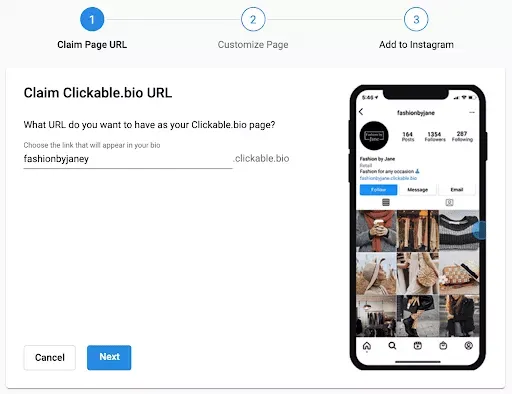
Select a clean, vertical layout designed for single-thumb navigation. Avoid wide, desktop-centric designs that require horizontal scrolling. Ensure the template supports large, tappable buttons and leaves ample white space between items. This reduces accidental clicks and improves the overall user experience on smaller screens.
Place your most important offer at the very top. Think of this as the "hero" section of your website. Whether it is a new product drop, a newsletter signup, or a limited-time discount, this top slot drives the majority of your conversions. Group secondary links, such as your blog or about page, below the primary call-to-action.
Upload your logo and set your background to match your social media aesthetic. Use your brand colors for button backgrounds and hover states. This visual continuity reassures visitors they are in a legitimate, professional environment. Inconsistent branding can make your link page feel like a generic directory rather than a dedicated destination.
A well-structured bio link page acts as a funnel, not a brochure. By limiting the number of primary links and highlighting your top offer, you reduce decision fatigue. Visitors should know exactly what to do within three seconds of landing on the page. This focused approach significantly increases the likelihood of them clicking through to your intended destination.
Add and organize your links
Your bio link is a landing page, not a bookmark folder. The goal is to guide visitors to the one action that matters most right now—whether that’s buying a new drop, reading a blog post, or following your TikTok. To do this, you need to add specific URLs and arrange them in order of priority.
Start by adding your primary link. This is the "hero" link that drives your current campaign or product launch. Place it at the top of the list. Most bio link tools allow you to drag and drop items, so simply pull your highest-priority URL to the first position. If you have a shop, blog, or social profile, add those next. Keep the total number of links manageable; too many options cause decision paralysis and lower click-through rates.
Open your bio link editor and add the URL for your most important content. This could be a new product, a recent video, or a limited-time offer. Ensure the link is live and directs to a mobile-friendly page. This top spot gets the most attention, so make it count.
Add your supporting links below the primary one. These might include your main website, other social media profiles, or a newsletter signup. Group similar links together if your tool allows categories. Keep descriptions clear and concise so users know exactly what they will find when they click.
Drag and drop your links to reflect their importance. The top link should be the one you want people to click most often. Secondary links can stay below. If you have a seasonal promotion or a time-sensitive event, move that link to the top and push older links down or remove them entirely. Regularly audit your list to ensure it stays relevant.
Consistency is key to building trust. Use the same language and visual style in your link titles as you do in your Instagram and TikTok content. If your brand is playful, your link titles should be too. If your brand is serious and professional, keep the tone aligned. This helps visitors confirm they are in the right place before they click.
Finally, test your bio link on a mobile device. Most of your traffic will come from phones, so ensure all buttons are easy to tap and load quickly. Remove any broken links immediately. A clean, well-organized bio link reduces friction and encourages visitors to explore your content further.
Customize design for brand consistency
Your bio link page is the digital handshake between your social content and your business. If the colors, fonts, or layout feel disconnected from your Instagram or TikTok feed, visitors sense a mismatch and often leave without clicking. Consistency builds trust; it signals that you are a professional creator who pays attention to detail.
To align your bio link with your brand identity, start by extracting the core visual elements from your most successful social posts. Do not guess what works—look at your analytics. Identify the hex codes of your primary accent colors and the font families you use in your video thumbnails. These are your anchors.
Next, apply these elements deliberately across your bio link builder. Here is how to structure the design process for maximum impact.
Choose one dominant brand color for your background or header and a secondary color for call-to-action buttons. Avoid using more than three colors to prevent visual clutter. Mobile screens are small, so high contrast between text and background ensures readability. If your Instagram feed is warm and earthy, do not use icy blue buttons on your bio link; it creates cognitive dissonance.
Select one font for headings and one for body text that mirrors the style of your social media graphics. If you use bold, sans-serif fonts in your TikTok thumbnails, use them here too. This creates a seamless transition for the eye. Avoid default system fonts like Arial or Times New Roman unless they are part of your specific brand aesthetic; they often look generic and unpolished.
Align your button arrangement with how you consume content on social media. If you post many short videos, use a vertical stack of buttons with small preview thumbnails. If your brand is more editorial or blog-focused, a bento-style grid with larger image cards may feel more appropriate. The layout should feel like an extension of your profile, not a separate website.
Always preview your bio link on both iOS and Android devices. Colors can shift between screens, and touch targets might be too small on certain devices. Ensure your buttons are at least 44x44 pixels for easy tapping. A design that looks great on a desktop monitor may be unusable on a phone, which is where 90% of your traffic will come from.
By treating your bio link as a branded extension of your social identity, you reduce friction for your audience. They should recognize your page instantly, even before they read your name. This subtle consistency is what turns casual scrollers into loyal followers.
Test links on mobile devices
Your audience lives in their pockets. With 99% of Instagram and TikTok traffic coming from mobile, a bio link that feels clunky or breaks on a small screen is a lost conversion. You are not building a website; you are building a thumb-friendly bridge.
Start by opening your bio link on both iOS and Android devices. Look for the "fat finger" problem—buttons that are too close together or text that requires zooming. If a visitor has to pinch-to-zoom to find your shop or newsletter signup, you have already lost them.
Speed is equally critical. Mobile networks are unpredictable. If your link-in-bio page takes more than three seconds to load, bounce rates skyrocket. Use a tool like Google PageSpeed Insights to check your load time. If it’s slow, compress images and remove unnecessary scripts.
Finally, verify your brand consistency. Does the font match your Instagram grid? Do the colors align with your TikTok aesthetic? A cohesive mobile experience builds trust instantly. Treat this testing phase as your final quality control before going live.
Update links for new campaigns
Your bio link is a living asset. When you launch a new product, drop a video, or start a limited-time promotion, your link page needs to reflect that shift immediately. Static links lose value the moment they stop matching current audience intent.
Here is the workflow to keep your bio link fresh without breaking existing traffic.
Review every URL on your page. Remove expired promotions, broken affiliate links, or outdated content. A clean page signals professionalism and keeps conversion rates high.
Insert links for your latest video, product launch, or newsletter signup. Prioritize the item you want to drive the most traffic to by placing it at the top.
Most social traffic is mobile. Open your link in a browser on your phone to ensure buttons are large enough to tap and text is readable without zooming. Adjust spacing if needed.
Save your changes and click each link one last time to confirm they route correctly. Update your social captions to point followers to the new link if the previous call-to-action has changed.
Common bio link mistakes to avoid
Even with the best design, small technical errors can break the funnel between your social posts and your destination. Fixing these issues is the difference between a passive profile and a high-converting asset.
Broken or expired URLs
Nothing kills momentum faster than a "404 Not Found" error. If you link to a specific product that is out of stock or a campaign that has ended, the visitor leaves immediately. Regularly audit your links to ensure every button leads to an active, relevant page.
Too many choices
Offering ten different links creates decision paralysis. Visitors on TikTok and Instagram are scrolling quickly; they need a clear path, not a maze. Limit your bio link to three or four high-priority destinations, such as your latest video, top product, or newsletter signup.
Ignoring mobile optimization
Almost all your traffic comes from mobile devices. If your bio link page loads slowly or requires horizontal scrolling, you lose the click. Test your link on a phone before publishing. Ensure buttons are large enough to tap and text is readable without zooming.
Click every single URL in your bio link tool. Check for typos, expired campaigns, or broken redirects. Replace any dead links with your current active content.
Review your link list. Remove low-performing or outdated options. Keep only the three to four links that drive the most value, such as your latest video or primary shop.
Open your bio link on a smartphone. Check that buttons are easy to tap and text is legible. Ensure the page loads quickly on a 4G connection.
No comments yet. Be the first to share your thoughts!