
Get custom link right
Before you paste a URL into your Instagram or TikTok bio, you need to verify the infrastructure. A custom link is not just a shortened address; it is a branded redirect that requires specific technical prerequisites to function reliably across social platforms.
First, secure a custom domain. You cannot create a true custom link without owning the domain name. Platforms like Short.io provide the infrastructure to manage these redirects, but you must connect your own domain to their service. This step ensures the link looks professional and builds trust with your audience.
Second, configure DNS records. You must add the necessary CNAME or A records to your domain provider’s settings. This verification process can take anywhere from a few minutes to 48 hours. Do not skip this check; an unverified domain will result in broken links that hurt your growth metrics.
Finally, test the redirect chain. Use a tool to ensure your custom link points to the correct destination without excessive hops. Long redirect chains slow down page load times and can trigger spam filters on social platforms. Keep the path direct and clean.
Build your custom bio link step by step
A custom bio link is the bridge between your social traffic and your business. Without it, Instagram and TikTok users hit a dead end. Here is how to set one up correctly.
Choose a domain and platform
Select a domain that matches your brand. Avoid generic names. A custom domain builds trust faster than a random string of characters.
Pick a tool that supports custom domains. Short.io offers free branded links and analytics. It is a reliable starting point for most creators.
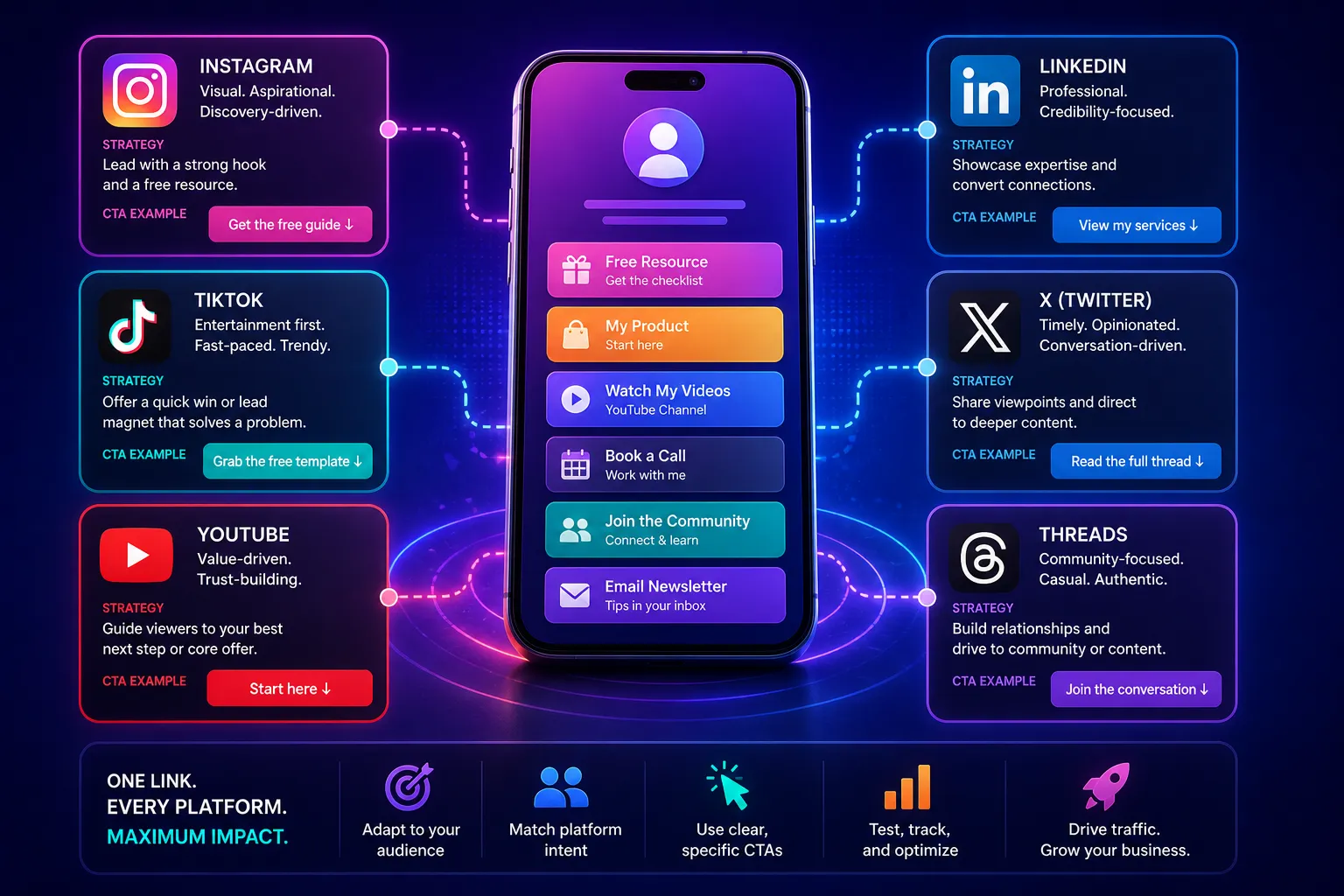
Go to your domain registrar. Update the DNS settings to point to your bio link platform. This takes a few minutes but ensures your link works everywhere.
Add your most important links. Put your primary offer at the top. Keep the design clean. Mobile users scroll fast; make it easy for them to click.
Enable click tracking. You need to know which links work. This data tells you what your audience actually wants to see.
Name your link clearly
Your link name should be short and descriptive. Use keywords that describe your offer. For example, use brand.com/offer instead of brand.com/2026. Short links are easier to type and remember.
Test before you publish
Click every link on your page. Check it on a phone and a computer. Broken links kill credibility. Make sure your analytics are recording clicks correctly.
Fix common mistakes
Even with the right tools, small errors in your bio link setup can kill your click-through rate. Instagram and TikTok users scroll fast; they don’t read instructions. If your custom link looks broken, confusing, or irrelevant, they leave.
Here are the most frequent pitfalls that undermine your bio link strategy and how to correct them.
Using vague or generic link names
A common mistake is labeling your link "Click Here" or "Link in Bio." These phrases offer zero context. Users on TikTok, in particular, need immediate clarity on what they are getting. A generic label feels like spam.
Rename your link to describe the specific value. Use "2026 Growth Checklist" or "Free Audit Template." The label should act as a micro-headline. It tells the user exactly what to expect before they even click.
Ignoring mobile preview and broken redirects
Many creators set up a custom domain but forget to test the actual destination on a mobile device. If your redirect is slow, or if the landing page is not mobile-optimized, you lose the click. Instagram users are almost exclusively on mobile.
Always click your own link from a phone before publishing. Check for:
- Slow load times
- Broken buttons
- Pop-ups that block content
Use a tool like Short.io to monitor redirect health. If a link returns a 404 or hangs, update it immediately. Broken links destroy trust faster than bad content.
Mixing too many platforms in one link
Some creators try to funnel all traffic to a single "Linktree" or similar aggregator. While useful for general browsing, this dilutes your primary growth goal. If you want TikTok followers, your link should lead directly to a TikTok follow page or a high-converting lead magnet, not a generic menu.
Keep your bio link focused on one primary conversion. If you have multiple offers, use a secondary link in your posts or stories. The bio link is your front door; don’t clutter it with every room in the house.
Custom link: what to check next
Before you spend hours designing your bio page, clear up the basics of how these links actually work. A custom link isn't just a pretty URL; it's a tracking pixel and a brand asset combined. Here are the practical answers to the most common hurdles creators face.
How do you create a custom link?
Creating a custom link involves two main steps: shortening the destination and branding the slug. First, take your long destination URL (like a Linktree or YouTube video). Paste it into a tool like Bitly or Short.io. Next, replace the random generated characters with a keyword relevant to your content, such as link.in/summer-sale. This makes the link memorable and easier to type in Stories.
How to custom link name?
The "name" of a link is usually the visible text or the domain slug that users see. In most bio link tools, you can edit the "Link Name" or "Button Label" directly in the dashboard. For the URL itself, the naming convention is yourdomain.com/keyword. Keep the keyword short, lowercase, and hyphenated if needed (e.g., yourdomain.com/merch-drop). Avoid spaces or special characters, as they break the link structure on social platforms.
How can I create a link?
To create a functional link, you need a destination and a container. The container is your bio link tool (like Linktree or Beacons), and the destination is the final webpage. Inside your bio tool, click "Add New Link." Paste your destination URL, then add a title for the button. Finally, ensure your custom domain is connected in the settings. Without a connected custom domain, your link will look like bio.tool/12345 instead of link.yourbrand.com.
How can I customize my URL?
Customizing your URL requires a custom domain, which you typically purchase from a registrar like Namecheap or GoDaddy. Once purchased, you must update your DNS records (usually a CNAME record) to point to your bio link provider. This process verifies ownership. After verification, the provider routes traffic from link.yourbrand.com to their servers, which then display your customized landing page. This step is essential for maintaining brand consistency across Instagram and TikTok.
No comments yet. Be the first to share your thoughts!